
“Publish or perish,” the haunting academic refrain goes.
But when you’re in the midst of endless dissertation or manuscript revisions, teaching courses, and applying to jobs, it can be difficult to keep track of everything you’re working on.
Enter Trello. Trello is a visual tool for organizing projects. In Trello, you create a ‘board’ for a project (or kinds of projects), and within the board you create lists of tasks that need to be completed. You can include due dates, assign tasks to individuals, and move cards across lists to track their status.
Often used for project management amongst teams, Trello can also be a good tool for keeping track of your own projects. My favourite use of Trello is for organizing and keeping track of my articles, chapters, and conference papers that I have in the works, from idea generation to publication.
I use the “Academic Publishing Tracker” Trello template created by Dr. Ann Gillian Chu. The template includes a number of lists for tracking your various academic publications. You can make use of a list for CFPs, journals of interest, and any ideas you have for future research, as well as the status of your publications from draft proposal to data analysis to writing to publication.
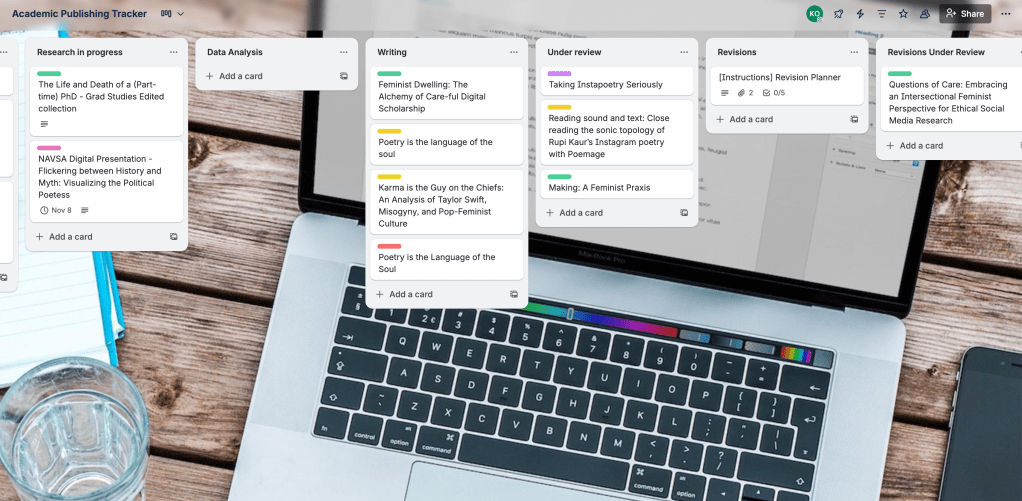
Personally, keeping a list of CFPs and Journals of Interest in Trello helps me eliminate some of the never-ending browser tabs I perpetually have open–and ensures I don’t lose something important when I inevitably get tired of having so many tabs open and bulk-close my browser.
One element of the template I find particularly helpful and smart is the use of colour-coded labels. In my version of this template, I have labels for book chapters, journal articles, pubic engagement, book reviews, monographs, interviews, conference presentations, and peer reviews.

I also like that this Trello template encourages users to celebrate the milestones in their academic publishing pipeline. When we’re in the throes of trying to land an academic position or get tenure, it can be difficult to take a moment to celebrate what you’ve achieved so far–even more so when you’re faced with a rejection.
Overall, it’s a smart and efficient template that allows users to customize to best fit their needs.
How do you keep track of your academic publishing pipeline? Let me know in the comments!
 Kiera Obbard